
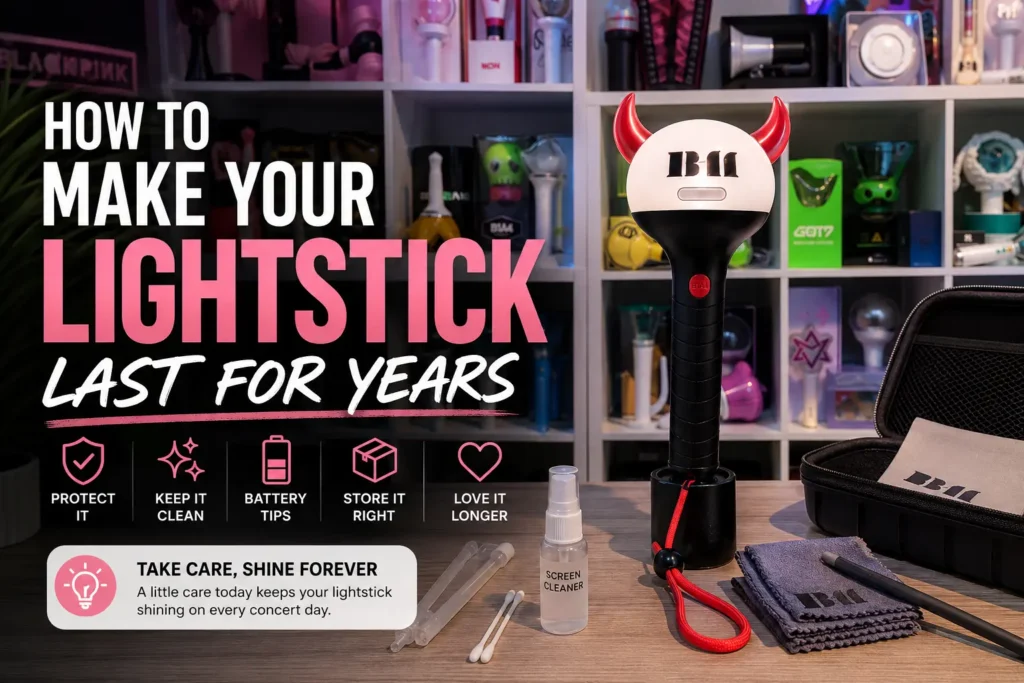
To clean a lightstick, take the batteries out, wipe it with a dry microfiber cloth, then spot-clean smudges with a barely damp corner of the cloth (lukewarm water, one drop of mild soap at most) and let it air-dry before the batteries go back in. Rusty battery contacts need a cotton swab with white vinegar instead.
This guide covers cleaning first, then the habits that keep an official lightstick working for years: battery care, handling, storage, travel and firmware.
TL;DR: Lightstick care comes down to four habits: take the batteries out after every use, clean with a barely damp microfiber cloth, store out of direct sunlight, and update the app before concert day. Of the four, removing the batteries matters most, since battery corrosion ruins more lightsticks than drops ever do.
How to Clean Your K-Pop Lightstick Without Damaging It
The safe way to clean a K-pop lightstick is a barely damp microfiber cloth with lukewarm water, and nothing stronger than that. Take the batteries out first, dry-wipe to lift dust, spot-clean smudges with one corner of the cloth, and let it air-dry fully before you reassemble it.
Regular cleaning is one of the most overlooked aspects of K-pop lightstick care. Dust, fingerprints, and concert residue (think: sweat, confetti, and sticky drinks) build up over time and can cloud the globe or degrade the plastic if left untreated. The good news is that cleaning your lightstick safely takes less than five minutes.
What You’ll Need
- A soft microfiber cloth (the kind used for glasses or phone screens)
- A second dry microfiber cloth or cotton swabs for detail work
- A small bowl of lukewarm water
- One drop of mild dish soap (optional, for tougher stains)
- Isopropyl alcohol (70%) on a cotton swab, for sticky residue only
What to avoid: Paper towels, rough cloths, acetone, bleach, multi-surface sprays, and window cleaners. These can scratch the plastic, strip surface coatings, or leave a cloudy residue on the globe.
Step-by-Step K-Pop Lightstick Cleaning Tutorial
Follow these steps in order for a safe, thorough clean that won’t mark the plastic:
- Remove the batteries first, because cleaning a lightstick with the batteries inside risks a short circuit if moisture gets near the compartment.
- Dry-wipe the whole lightstick with a microfiber cloth to lift loose dust and fingerprints from the globe and handle, using light circular motions without pressing hard.
- For smudges and stains: dampen one corner of your microfiber cloth with lukewarm water and a tiny drop of dish soap, then gently wipe the affected area. Follow straight away with the dry side of the cloth so that no water sits on the surface.
- For sticky residue: Dab a cotton swab with a small amount of 70% isopropyl alcohol and gently rub the sticky spot. This is safe on most lightstick plastics but test on a small hidden area first.
- Clean the handle and strap loop: these areas collect the most grime, so use a slightly damp cloth or a cotton swab to get into the crevices around the buttons and the strap attachment point.
- Let it air-dry fully on a clean, dry surface for a few minutes before you reattach the strap or put the batteries back in.
For a visual walkthrough of this process, watch this helpful cleaning tutorial: How to Clean Your K-Pop Lightstick.
Dust Under the Cap, Light Scratches and Sticker Residue
These three problems need a little more than a cloth, and each one has a safe fix as long as you work gently, because the clear globe scratches far more easily than the handle.
- Dust under the clear cap: check your model’s manual before opening anything. Some caps twist off, many are glued, and forcing a glued cap cracks it. If yours doesn’t come off, a soft dry brush along the seam lifts most of the dust without opening the lightstick.
- Light scratches on the globe: fine scuffs soften with a polish made for clear plastic (fans often use Meguiar’s PlastX), worked in small circles with a microfiber cloth. Use it on the clear globe only, never on printed logos or painted parts, and keep in mind that deep scratches and cracks won’t polish out.
- Sticker or tape residue: the 70% isopropyl alcohol swab from the steps above lifts it. Never use acetone or nail polish remover, which strips paint and color from the plastic.
K-Pop Lightstick Battery Best Practices
The most important battery habit is simple: take the batteries out whenever the lightstick is not in use. Use name-brand alkaline cells, never mix old and new or different brands, and check your lightstick’s manual before trying rechargeables, since some models are not compatible with them.
Proper K-pop lightstick maintenance starts with choosing the right batteries and using them correctly.
- Go name-brand: Reputable alkaline batteries (like Duracell or Energizer) are significantly less prone to leakage than generic alternatives. Most lightsticks take AAA or AA cells, but check your manual to confirm which size yours needs.
- Never mix batteries: Don’t combine old and new batteries, or mix different brands. Mismatched batteries discharge unevenly, which increases leakage risk and can reduce brightness.
- Be careful with rechargeables: Rechargeable NiMH batteries operate at a slightly different voltage than standard alkaline ones, and some lightsticks are not compatible with them, so always check your lightstick’s official manual before using rechargeables. You can find compatible battery recommendations on Weverse or the official fan cafe for your group.
Getting Rid of Corrosion and Battery Acid
If there’s one habit every lightstick owner should build, it’s this: never store your lightstick with the batteries inside.
Alkaline batteries can leak a corrosive fluid (potassium hydroxide) over time, even when they are never used. This fluid corrodes the metal contacts inside the battery compartment, and that damage is often permanent. It doesn’t matter how new or expensive the batteries are; if left long enough, leakage can and does happen.
According to Duracell’s battery-care guidance, batteries should be removed from any device that is being stored or that won’t be used for several months, because many devices keep drawing a small current even when switched off.
Here is what to do instead, after every concert and before the lightstick goes back on the shelf:
- Remove the batteries right after every concert or practice session, even if you plan to use the lightstick again soon.
- Store the batteries separately in a cool, dry place, away from the lightstick itself.
- If you spot white or greenish residue on the contacts, gently clean them with a cotton swab lightly dipped in white vinegar or lemon juice, since these mild acids neutralize the alkaline residue. Wipe with a dry swab afterward and allow the contacts to air-dry completely before inserting new batteries. Never use the lightstick while the contacts are still damp.
Battery corrosion is the leading cause of lightstick damage, so this single habit protects your investment more than anything else.
🔗 Learn more about How to clean corrosion and battery acid from a lightstick if it’s already happened.
Handling Your K-Pop Lightstick with Care
Most lightstick damage comes from a single drop, not from years of use. The internal LED assembly, wiring, and Bluetooth chip can shift on impact even when the casing looks fine. Use the wrist strap at concerts, carry it in a soft pouch, and keep it where it can’t roll off a surface.
Even the most thorough cleaning routine won’t help if your lightstick takes a bad knock. The internal components are more fragile than the sturdy outer casing might suggest.
Safe K-Pop Lightstick Handling Tips
- Avoid dropping your lightstick, because the LED assembly, internal wiring and Bluetooth chip can be dislodged by impact even if the outer casing looks completely undamaged afterward.
- Waving it during concerts is fine, but shaking it hard, swinging it by the strap or slamming the handle against your palm again and again can loosen internal connections over time.
- When carrying it in a bag, place it in a soft pouch or wrap it in a piece of clothing. The globe is especially vulnerable to scratches from keys, chargers, and other bag contents.
- Avoid leaving it loose in a cup holder or car seat where it can roll and fall.
Pro tip: If your lightstick came with a wrist strap, use it at concerts. Most cracked casings come from one drop on arena concrete, not from years of use.
K-Pop Lightstick Storage and Display
Store your lightstick out of direct sunlight, upright on a stand or in a dust bag, and away from heat. UV light is what yellows clear plastic and makes it brittle, so a shelf away from windows or a display case adds years to its life.
How you store your lightstick when it’s not in use has a significant impact on its lifespan.
- Keep it out of direct sunlight: Prolonged UV exposure causes clear plastic to yellow and become brittle. A display case, a shelf away from windows, or a dedicated storage box are all good options.
- Use a lightstick stand: A proper stand keeps your lightstick upright and prevents it from rolling off surfaces, which is a surprisingly common cause of globe cracks.
- Use a cover or dust bag: Many lightsticks come with a protective pouch; if yours didn’t, a microfiber bag works perfectly. This prevents dust buildup and minor surface scratches over time.
- Avoid extreme temperatures: Don’t leave your lightstick in a hot car or near a heater. Heat can warp plastic and accelerate battery degradation even in storage.
If you want to display it, acrylic display cases and figure stands work well for most models, as long as they block UV while keeping the piece visible.
Traveling With Your K-Pop Lightstick
If you are taking your K-pop lightstick to concerts abroad or to fan meetings, a little preparation keeps it safe in transit.
- Carry it in hand luggage: Most airlines allow lightsticks in carry-on bags. Checked baggage is riskier due to pressure changes, rough handling, and temperature swings in the cargo hold.
- Check battery regulations: Loose lithium batteries have specific airline restrictions. According to the TSA, spare lithium batteries must travel in your carry-on, never checked baggage, with the terminals protected against short circuit, while standard alkaline batteries are generally unrestricted.
- Pack it carefully: Wrap your lightstick in a soft clothing item or a padded pouch, and keep heavier items away from the globe, which is the most vulnerable part.
- Remove batteries for the journey: Even during travel, store batteries separately to avoid accidental activation or leakage in transit.
Keeping Your Lightstick’s Firmware and App Up to Date
Modern lightsticks are Bluetooth devices, so keep the official fandom app and the lightstick’s firmware up to date. An out-of-date app is the most common reason a lightstick suddenly stops connecting after a phone update.
Modern K-pop lightsticks are smart devices, and many connect via Bluetooth to an official fandom app (such as Weverse or group-specific apps) to sync color and lighting modes during concerts. Keeping the software side healthy matters just as much as physical care.
Lightstick Firmware and App Maintenance
- Keep firmware updated: Manufacturers occasionally release updates that improve Bluetooth performance, add lighting modes, or fix connectivity bugs. Check the official app or your group’s fan site periodically for announcements.
- Check app compatibility: If your phone’s OS updates and your lightstick suddenly stops connecting, the app may need an update too, and official updates should only ever come from the app store.
- Pair carefully at concerts: Bluetooth interference is heavy in large venues, so follow the official pairing instructions closely and make sure your lightstick has fresh batteries or a full charge before the show.
🔗 If sync still acts up after the updates, work through our official lightstick troubleshooting guide step by step.
If your lightstick is past saving, every lightstick in our collection is official, with live stock and prices on each page.
Lightstick Care FAQ
Yes, every time, because alkaline batteries can leak potassium hydroxide even when unused, and corrosion on the contacts is the leading cause of lightstick damage. Store the batteries separately in a cool, dry place until the next show.
Not household cleaners: acetone, bleach and multi-surface sprays strip coatings and cloud the acrylic. A barely damp microfiber cloth handles everyday dirt, and 70% isopropyl alcohol on a cotton swab is fine for sticky residue only, as long as the batteries are out first.
Yes, prolonged UV exposure yellows clear plastic and makes it brittle, so a shelf away from windows or a display case can extend its lifespan by years.
Yes, in your carry-on, since most airlines allow lightsticks in hand luggage and checked baggage is riskier because of pressure changes, rough handling and temperature swings. Take the batteries out before you fly and pack them separately.
With basic care (batteries out after use, no direct sun and occasional cleaning), an official lightstick lasts many years and multiple tours. Most “dead” lightsticks are battery-corrosion casualties rather than hardware failures.
Great K-Pop Lightstick Care is Simple
A well-maintained K-pop lightstick can last for many years and countless concerts. The habits that matter most are straightforward: remove the batteries after every use, store it away from heat and sunlight, handle it gently, and keep the firmware current. Do those things consistently, and your lightstick will be ready to light up every show.


Pingback: BABYMONSTER Concert Essentials: CHOOM Tour Checklist
Pingback: BTS ARMY Bomb: Versions, Ver.4 vs Ver.3 & Buying Guide
Pingback: 10 Must-Have K-Pop Lightsticks for Your Collection in 2026 - Lightstick Blog
Pingback: How to Order K-pop Merch Online: A First-Timer's Guide
Pingback: What Is a K-pop Lightstick? Meaning & Fandom Culture – Lightstick Blog