
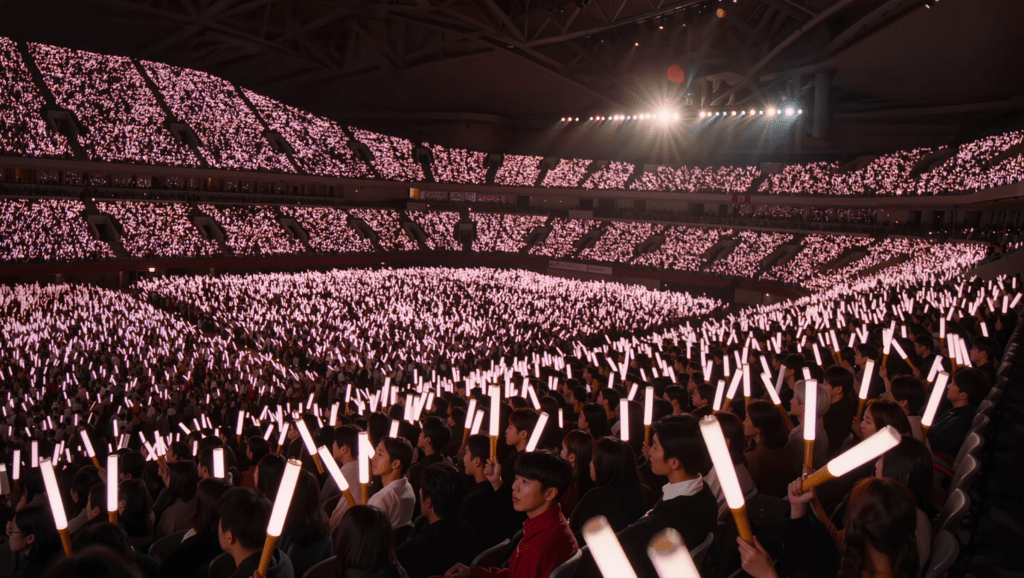
The first time you see 50,000 lightsticks change color at once, you assume everyone pressed a button together, but nobody in that crowd is controlling their own stick. A K-pop lightstick is not a chemical glow stick (the plastic tube you snap and shake) but a small radio-controlled device, and during a show the production team is driving it. That’s the real answer to how do lightsticks work at a concert: the effect isn’t in your hand, it’s in the building.
TL;DR: A K-pop lightstick is an LED light with a wireless receiver inside. You pair it to your phone over Bluetooth once, to register your seat. During the show the venue broadcasts control signals over radio or infrared, and your stick obeys the room instead of you.
- How K-pop lightsticks work, in one pass
- It’s not a glow stick: what’s actually inside
- Bluetooth and the official app
- How the concert sync actually happens
- Batteries, charging, and what powers a lightstick
- Does the version you own still sync?
- Why a fake lightstick won’t sync
- Why didn’t my lightstick sync?
- Do you actually need the app?
- Frequently asked questions
- Bottom line: how K-pop lightsticks work
How K-pop lightsticks work, in one pass
A modern official lightstick (the branded light a group’s fans wave at concerts) has three parts that matter: an LED system, a wireless receiver and a power source. On its own, it’s a manual light: you press the button, you cycle colors, and that’s it.
The interesting behavior starts when it stops listening to you, because at a concert it listens to the venue instead. The stick takes its orders from the production team, not from the person holding it, and that handoff is the whole trick.
🔗 If you’re new to the object itself, start with our guide to what a K-pop lightstick is, which covers the what while this post covers the how.
It’s not a glow stick: what’s actually inside
Search this question and half the results explain chemical glow sticks. Those are the sealed tubes you snap to mix two liquids, and they glow for a few hours before dying for good. A K-pop lightstick shares nothing with them except a rough shape.
Inside an official stick there’s a controller chip, an LED array, a power source, and a wireless receiver. That receiver is why someone at a mixing desk can change the color of the thing in your hand.
Why the venue can override your lightstick
The receiver doesn’t need a live, two-way connection to do its job. It listens for a broadcast, the way a car radio listens for a station. Nothing gets negotiated in the moment, and nothing needs your permission once you’re in the room.
That design choice is what makes stadium scale possible. Bluetooth is built for a handful of paired devices, not fifty thousand simultaneous conversations with one host. So the show itself doesn’t run over your Bluetooth link but is broadcast to every stick in the venue at once.
RF and IR, the two broadcast methods
Most large-scale systems use RF, short for radio frequency. Radio carries a long way and passes through bodies, walls, and seating tiers. In a packed arena that’s exactly what you need, because line of sight to the back rows doesn’t exist.
Some rigs use IR instead, short for infrared, the same invisible light your TV remote uses. Infrared needs line of sight, which sounds like a weakness but is actually the feature. An operator can aim infrared emitters at one block of seats and light only that block, like a spotlight that carries instructions instead of light.
In practice productions mix the two, and the exact protocol varies by tour and by lightstick model. What stays constant is the shape of the system: one sender, thousands of receivers, no input required from you.
Bluetooth and the official app
Most current lightsticks pair to an official app over Bluetooth, the same short-range wireless link your phone uses for earbuds, and the app does two jobs. Outside a show, it lets you change colors by hand and run a few effects. Before a show, it’s how you tell the system where you are.
It’s worth separating the two roles, because they get confused constantly: Bluetooth handles registration, and the venue broadcast handles the show.
Entering your seat
You type in your section, row, and seat, and that single step is what makes the coordinated patterns possible. It tells the system where your stick is sitting, so the broadcast can address your corner of the crowd on its own.
How the concert sync actually happens
During the show, the production system broadcasts control signals to every stick in the venue at once. Because it knows where each registered seat is, it can send different instructions to different parts of the room.
Why the colors form waves and words
This is the seat mapping paying off: the system treats the crowd like a low-resolution screen, and each lightstick is one pixel. Send the right color to the right seats and you get a wave rolling across the stands, or text spelled out in the audience.
The pre-show check
Newer versions add a pre-show feature: before the group appears, your stick lights up in sync with the fans near you. It’s a quiet confirmation that you’re registered correctly, before the music starts.
The BTS Army Bomb Ver.4 is the clearest example to point at. It ships in a Bluetooth-enabled configuration built to pair with the current tour system, which is why the newest version keeps getting recommended for tour dates.
🔗 For another walkthrough of the in-venue mechanics, Koreaboo’s piece on how lightsticks work at concerts covers it well.
Batteries, charging, and what powers a lightstick
Power is the part new buyers skip until the night of the show. It’s also one of the most common reasons a stick sits dark while the section around it moves.
What batteries do lightsticks use?
Most official K-pop lightsticks run on three AAA batteries. That covers the BTS Army Bomb Ver.4, the TWICE Candybong, the Stray Kids lightstick, and the SEVENTEEN Carat Bong Ver.3, all with standard replaceable cells rather than a sealed pack. You open the base, drop in three AAA, close it, and you’re done.
The upside of replaceable cells is that a dead lightstick is a two-minute fix at any corner shop. The downside is that nothing reminds you the night before.
Replaceable cells vs rechargeable models
A smaller group of models and official add-on packs go the rechargeable route over USB-C. HYBE sells an official rechargeable battery unit that drops into the same tray the AAA cells sit in, so one stick can be either, depending on what you put inside it rather than on the stick itself.
The Army Bomb Ver.4 has no built-in rechargeable battery. Its optional Ver.4 cradle is a USB-C powered stand: it holds the stick upright for display and runs it at home from wall power. That’s the practical value, because you can leave it lit on a shelf without burning the cells you want for the concert. Cradles are version-specific, so check compatibility before buying one for an older stick.
On run time, a fresh set comfortably outlasts a single show in most cases. The usual failure isn’t a stick dying mid-concert but a stick that was already half-drained from sitting switched on in a bedroom for a month.
Pro tip: Put a fresh set in the night before, and carry three spares in your bag. Arena shops almost never stock AAA, and a dead stick during a synced number is the one problem you can’t fix from your seat.
Does the version you own still sync?
Here’s the catch most first-time buyers miss: a lightstick only joins the coordinated show if its hardware speaks to the current tour’s system. Older sticks still light up by hand, but some tours only sync the latest version, meaning the newest official model, usually released alongside a new era or comeback. Check what the tour supports before you rely on an older one.
🔗 Weighing an older Army Bomb against the current one? Read the BTS ARMY Bomb versions and Ver.4 vs Ver.3 buying guide.
Why a fake lightstick won’t sync
Here’s the most useful side effect of all this machinery. A counterfeit can copy the shape, the box, the hologram sticker, and roughly the weight. It cannot copy the licensed receiver and the protocol the tour is broadcasting on.
So a fake behaves fine at home, where it lights up, cycles colors and photographs well on a shelf. Then the venue broadcast starts, and it sits there glowing whatever color you left it on while the seats around you move as one.
That makes concert sync the hardest thing to fake in this category. Packaging is cheap to clone and gets better every year. A receiver that answers a tour’s control system is a different problem entirely.
🔗 Checking a stick you already own, or one you’re about to buy secondhand? Work through How to Tell If Your Lightstick Is Official.
Why didn’t my lightstick sync?
Most sync failures trace back to five things, and four are fixable at home the night before.
- Low battery: a stick with weak cells can light up and still fail to hold a connection.
- An outdated app: tours push updates close to the date, and venue Wi-Fi won’t save you.
- Bluetooth or location permissions off: the app usually needs both to register a seat.
- The wrong seat entered: a typo puts your pixel in the wrong place.
- An unsupported version: if the tour only syncs the current model, nothing fixes an older one.
🔗 If your stick won’t pair or behaves oddly, work through our Official Lightstick Troubleshooting Guide before the show.
Do you actually need the app?
Honestly, only at the concert, because the app is the bridge to the venue system, and that bridge is useless if you’re not in the venue. Plenty of buyers download it, open it once, and never touch it again. That’s a completely fine way to own a lightstick.
At home it works as a manual light with no setup at all. So if you bought your stick for display, ignore the app entirely.
🔗 If you’re looking for a stick with full concert sync, browse the Kpop Lightsticks collection.
Frequently asked questions
The venue’s production system broadcasts control signals to every lightstick at once, over radio frequency or infrared. Because your seat is registered in the app, the broadcast can address your part of the crowd specifically.
Only for concerts, where the app registers your seat so the venue can sync your stick. At home it works as a manual light with no app needed.
Usual causes are low battery, an outdated app, Bluetooth turned off, the wrong seat entered, or a version the tour doesn’t support. Charge and update at home, and double-check your section, row, and seat.
Older sticks still light up, but some tours require the current version for full sync. Check whether your group’s latest tour supports your version before relying on it.
Most official K-pop lightsticks use three AAA batteries, including the BTS Army Bomb Ver.4, the TWICE Candybong and the Stray Kids lightstick. Some models and official add-on packs offer a USB-C rechargeable battery instead.
No, because a counterfeit can copy the shape and packaging, but not the licensed receiver the venue broadcasts to. It will keep glowing on its own while the seats around it change color together.
Bottom line: how K-pop lightsticks work
A lightstick is a manual light that becomes something bigger the moment it joins a system. You provide one input, your seat, and the broadcast does the rest. The coordinated ocean isn’t fans reacting fast but a room being treated as a screen.
That’s also why the app feels pointless until it isn’t, and why a counterfeit passes every test except the one held in the venue.
You hold one pixel, and the full picture only exists from the stage.


Pingback: How to Order K-pop Merch Online: A Global Buyer’s Guide – Lightstick Blog
Pingback: Official Lightstick Troubleshooting – Guide for Fans – Lightstick Blog